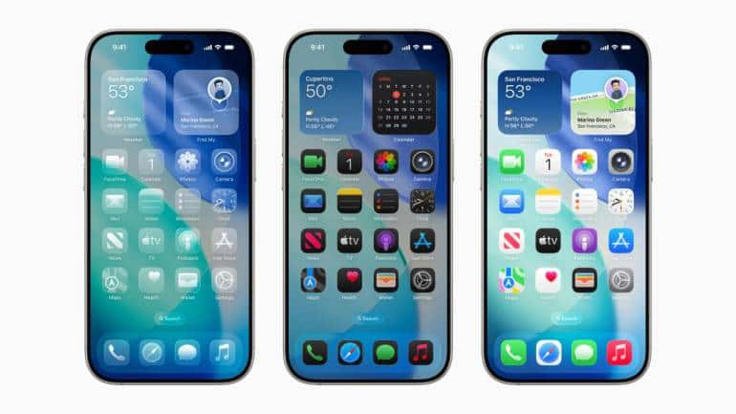
Apple has officially rolled out the iOS 26.2 update this December, bringing refinements to design, performance, and security. But many iPhone users are asking: Is it mandatory to install iOS 26? Let’s break down what this update means, how to install it, and which devices are supported.
🚀 Is iOS 26 Mandatory?
- Apple has shifted iOS 26 from an “optional upgrade” to a recommended update.
- While you can technically stay on iOS 18 for now, Apple has hinted that security updates for iOS 18 may stop in the coming months.
- If you want to stay protected against vulnerabilities and enjoy the latest features, upgrading to iOS 26.2 is strongly advised.
✨ What’s New in iOS 26.2?
- Liquid Glass Interface: A translucent, dynamic design that adapts to your content.
- Apple Intelligence Upgrades: Expanded live translation, smarter screenshot capture, and enhanced search.
- Call Screening: Automatically answers calls, requests caller info, and lets you decide whether to accept.
- Hold Assist: Keeps your place in line during customer service calls and alerts you when it’s time to pick up.
- CarPlay Enhancements: Support for Live Activities, showing real‑time updates like food delivery status or sports scores.
- Bug Fixes & Performance: Improvements to battery life, stability, and app responsiveness.
📱 Supported Devices
According to Apple, iOS 26 is compatible with the following iPhones:
- iPhone 17 Series: iPhone 17, 17 Pro, 17 Pro Max, iPhone Air
- iPhone 16 Series: iPhone 16e, 16, 16 Plus, 16 Pro, 16 Pro Max
- iPhone 15 Series: iPhone 15, 15 Plus, 15 Pro, 15 Pro Max
- iPhone 14 Series: iPhone 14, 14 Plus, 14 Pro, 14 Pro Max
- iPhone 13 Series: iPhone 13, 13 mini, 13 Pro, 13 Pro Max
- iPhone 12 Series: iPhone 12, 12 mini, 12 Pro, 12 Pro Max
- iPhone 11 Series: iPhone 11, 11 Pro, 11 Pro Max
- iPhone SE: 2nd generation and later
🔧 How to Install iOS 26.2
Before updating, make sure to back up your iPhone via iCloud or your computer. Then:
- Plug your iPhone into a power source and connect to Wi‑Fi.
- Go to Settings > General > Software Update.
- If multiple updates are available, select iOS 26.2.
- Tap Download and Install, enter your passcode, and follow the prompts.
The installation time can vary from 30 minutes to a couple of hours, depending on your device and internet speed.
🧭 Final Thoughts
While iOS 26.2 isn’t technically mandatory, Apple’s shift toward recommending it—and the likelihood of ending iOS 18 security patches—makes upgrading the smart choice. With its blend of design polish, smarter AI features, and stronger security, iOS 26.2 ensures your iPhone stays future‑ready.
About The Author